
At a Glance
Smart Feed centralizes all Zencity-generated Smart deliverables—decision-ready insights, alerts, and reports created through certified methodologies—in one location, allowing you to quickly filter, evaluate, and share trusted analysis for data-driven community decisions.
Access Your Smart Feed
Navigate to Smart Feed using either path:
- Left navigation: Click Smart Feed in the left sidebar
- ZencityOS: Select Smart Feed from the main ZencityOS menu
View and Filter Your Smart Feed
Default Feed Display
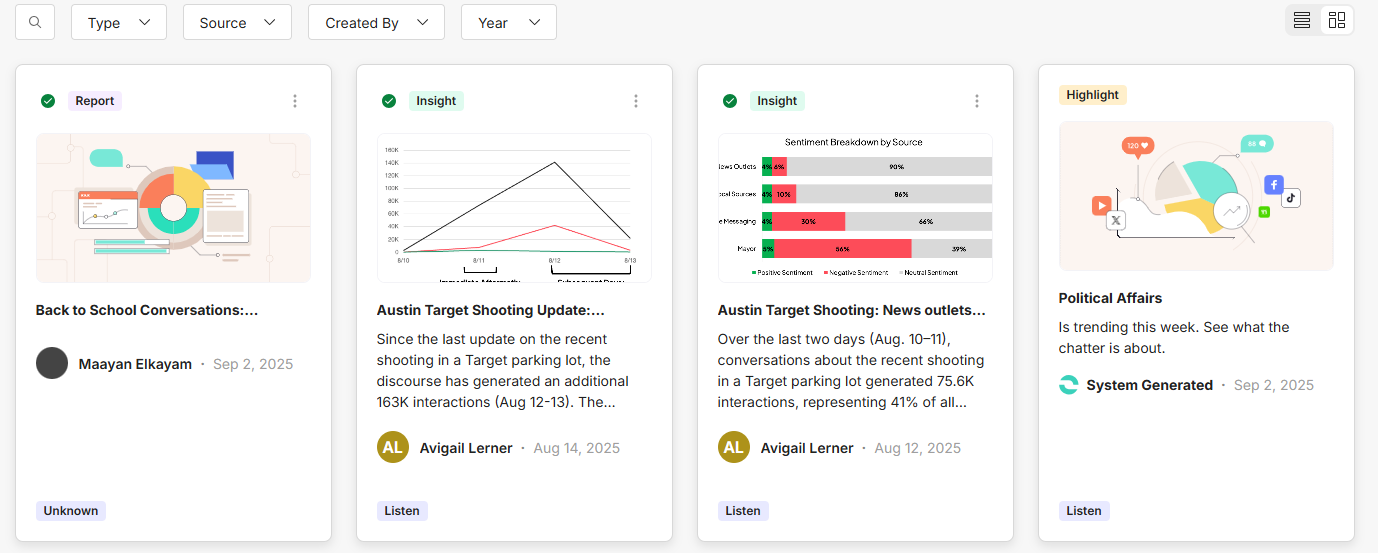
Your Smart Feed displays all Smart deliverables sorted by most recent first. Each item shows:
- Deliverable title and preview text
- Type label (Report, Insight, or Highlight)
- Publication date
- Author information
- Source module (Listen or Ask)
Apply Filters
Use the filter options to narrow your view:
Type
- Report
- Insight
- Highlight
Source
- Listen
- Ask
Created By
- User
- System
Year
- Select from available years
Switch View Modes
Toggle between two display options:
- List view: Compact rows showing key details
- Card view: Expanded cards with more visual information
 Understanding Smart Feed Deliverables
Smart Feed deliverables are decision-ready outputs created by Zencity to help you understand what's happening in your community. Unlike raw data or self-created reports, these are curated, analyzed content designed to surface meaningful patterns and actionable insights.
Smart ItemTypes
Highlights Automated alerts that flag unusual activity or significant changes in your community data. These system-generated notifications help you quickly spot emerging trends, spikes in specific topics, or noteworthy shifts in community sentiment from both the Listen and Ask modules.
Insights Expert analysis created by Zencity analysts that translates complex community data into clear, understandable summaries. These human-authored explanations help you understand not just what is happening, but what it means for your community decision-making. Available from the Listen module to provide complex analysis of social media discourse.
Reports are Comprehensive analytical documents that provide in-depth analysis on specific topics or time periods. Report types include:
- Best Practices: Cross-client topical analysis with benchmarking insights
- Executive: High-level summaries designed for leadership decision-making
- Overview: General summaries for periodic reviews or project assessments
- Recurring: Template-based reports delivered on regular schedules
What Makes These "Smart"
All deliverables in Smart Feed are created by Zencity using certified methodologies—either through automated systems with proven logic or by trained analysts. This distinguishes them from user-created reports or raw data exports, ensuring you receive vetted, contextual information ready for decision-making.
Working with Feed Items
Click on any deliverable to access its full content. Depending on the item type, you'll either see expanded details or be directed to the source module for the complete view.
How It Works
Smart Feed automatically updates daily whenever new Zencity-generated content becomes available from your Listen and Ask modules. This ensures you always have access to the latest community intelligence without needing to check multiple locations.
The centralized approach replaces the previous method of accessing deliverables scattered across different modules and sections, giving you a single authoritative source for all Zencity-created insights about your community.
Comments
0 comments
Please sign in to leave a comment.